
[DE] Eventformulare für Veranstaltungen
Eventformulare richtig erstellen und einsetzen
Anmeldungen zu Veranstaltungen können ganz einfach mit dem Formular Editor der eworx Marketing Suite abgewickelt werden. Mit den zahlreichen Funktionen der Eventformulare, haben Sie die Möglichkeit, Ihr Anmeldeformular individuell und umfangreich zu gestalten.
In diesem Whitepaper erfahren Sie, wie Sie ein Eventformular für Ihre Veranstaltung richtig erstellen und einsetzen.
Wie erstelle ich ein Eventformular in der eworx Marketing Suite?
Es gibt zwei Möglichkeiten, wie Sie ein neues Eventformular erstellen können.
Unter „events“ > „Eventformulare“ haben Sie die Möglichkeit, ein neues Eventformular zu erstellen, indem Sie auf den Button „ +Neues Eventformular erstellen“ klicken. Eine weitere Möglichkeit besteht am Event-Dashboard eines bestehenden Events.
Bei beiden Varianten haben Sie die Möglichkeit ein bestehendes Formular zu kopieren oder ein neues Eventformular zu erstellen. Nach dem Speichern erscheinen zusätzliche Reiter und Auswahlmöglichkeiten, mit denen Sie das Formular weiter bearbeiten können.
Alle Eventformulare finden Sie unter „events“ > „Eventformulare“. Dort haben Sie auch die Möglichkeit, Ihre bestehenden Eventformulare zu bearbeiten.

Welche Einstellungen können in den einzelnen Reiter des Eventformulars gesetzt werden?
Welche Anpassungen sind in den Einstellungen möglich?
Wenn Sie ein neues Formular erstellen, muss der interne Name festgelegt werden. Ebenfalls können Sie im Feld „Beschreibung“ interne Notizen hinterlegen. Ebenfalls haben Sie die Möglichkeit, das Formular ab einem bestimmten Zeitpunkt zu sperren. Ab diesem Deaktivierungs-Zeitpunkt erscheint beim Aufrufen des Formulars jener Text, den Sie im vorgesehenen Textfeld bestimmen. Bei Eventformularen haben Sie auch noch die Möglichkeit, nur die Anmeldung und nicht das gesamte Formular zu sperren. Weiters können Sie festlegen, ob Sie nachträgliche Datenänderungen durch den Empfänger verweigern möchten und ob englische Systemtexte zusätzlich angezeigt werden sollen.

Welche Anpassungen sind im Reiter „Inhalt“ möglich?
Im Reiter „Inhalt“ stehen Ihnen zusätzlich zu den „Empfängerfeldern“ eigenständige „Formularfelder“ zur Verfügung, welche nicht bei den Empfängerdaten gespeichert werden, sondern für besseren Überblick nur beim Formular gespeichert werden und exportiert werden können.
Verwenden Sie „Empfängerfelder“ für Daten, die bereits bei Ihren Empfängern hinterlegt sind (z.B. ‚Nachname‘ und ‚E-Mail‘) bzw. die Sie für die weitere Verwendung erheben wollen (z.B. ‚Firma‘).
Für Informationen, welche Sie nur für das Event erheben möchten (z.B. Auswahl der Vorträge, Menüwahl etc.), legen Sie ein „Formularfeld“ an.
Eine genaue Beschreibung, wie das Formular angepasst werden kann, finden Sie hier.

Welche Anpassungen sind im Reiter „Aktion“ möglich?
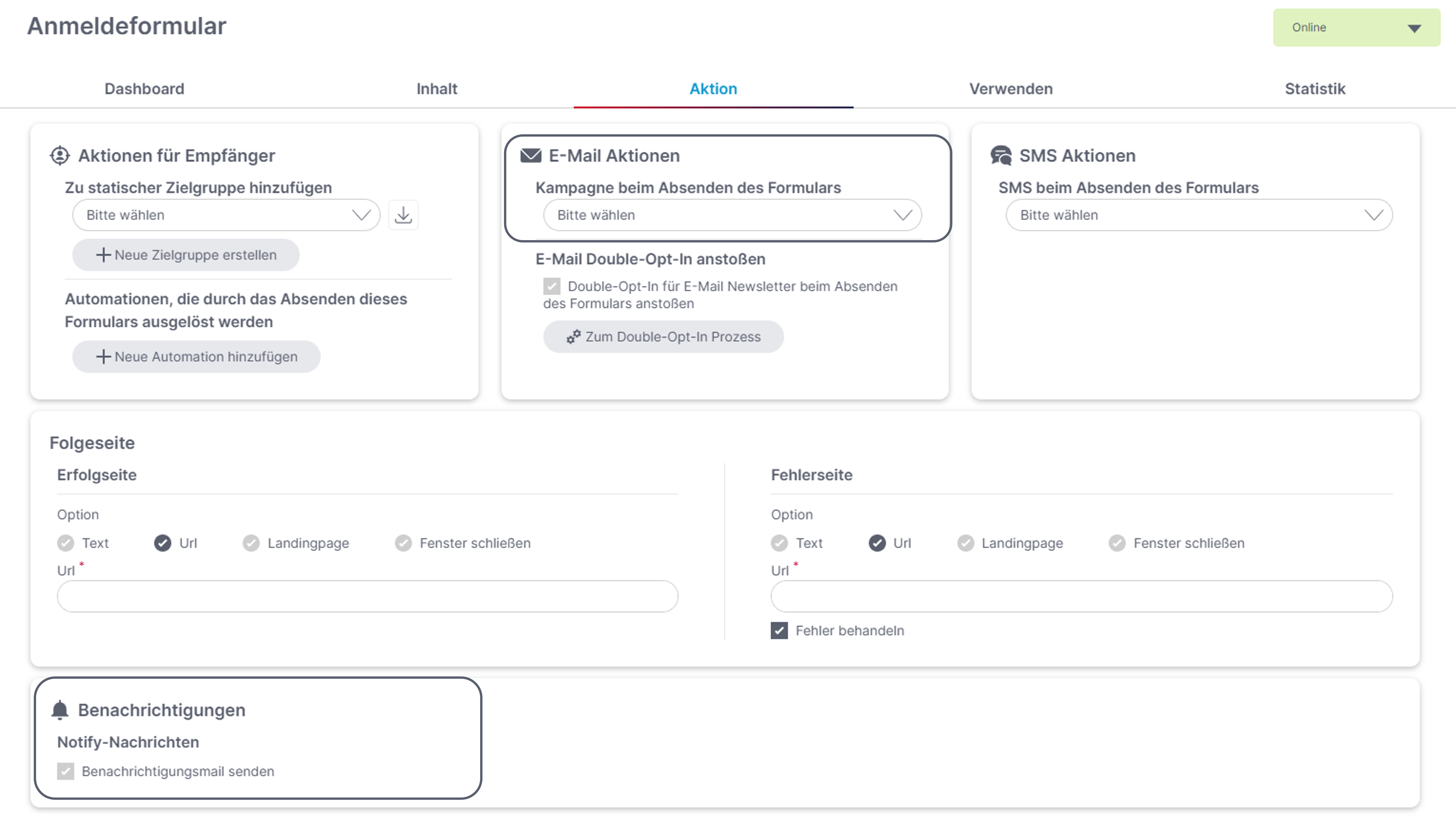
In der Registerkarte „Aktion“ können Sie bei „Kampagne beim Absenden des Formulars“ jene ereignisabhängige E-Mail oder SMS Kampagne auswählen, die Sie als Bestätigung für die Anmeldung versenden möchten. Hier ist es auch möglich, eine Kampagne aus dem „Newsletterarchiv“ auszuwählen. Bei Eventformularen ist es ebenfalls möglich, dass Eventformular zu einem gewünschten Event hinzuzufügen.
Ebenfalls können Sie einstellen, wer eine „Benachrichtigungsmail“ erhalten soll, wenn neue Anmeldungen eintreffen. Falls das Kontingent voll ist und Sie die Wartelistenfunktion (siehe weiter unten) aktiviert haben, beinhaltet die Benachrichtigung den Hinweis auf die Warteliste.
Weitere Informationen, welche Einstellungen im Reiter „Aktion“ des Formulars noch getroffen werden können, finden Sie hier("Formular-Bearbeitung Reiter "Aktion"").
Welche Anpassungen sind im Reiter „Verwenden“ möglich?
Das Formular können Sie in einem Newsletter verlinken und auch in eine Website einbinden. Im Reiter „Verwenden“ finden Sie verschiedene Möglichkeiten, wie das Formular auf der Website eingebunden werden kann. Eine Anleitung, wie das Formular auf Ihrer Website eingebunden werden kann, finden Sie hier.
Wie die Eventanmeldung im Newsletter verlinkt werden kann, finden Sie im folgenden Whitepaper.
Was muss ich beim Empfängerabgleich beachten?
Beim „Datenabgleich“ (zu finden im Reiter „Verwenden“ – am Ende der Seite) ist für Veranstaltungen die Option „Bereits existierenden Empfänger aktualisieren“ zu verwenden, damit die Daten eines Empfängers nicht überschrieben werden, wenn sich eine andere Person als der ursprüngliche Newsletter-Empfänger in einem Newsletter über das Eventformular zum Event anmeldet.

Welche Anpassungen sind im Reiter „Anmeldung“ möglich?
Im Register „Anmeldung“ können Sie die maximal zulässige Teilnehmerzahl definieren, sollte Ihr Platzkontingent begrenzt sein. Ebenfalls können Sie hier einstellen, ob eine Warteliste verwendet werden soll und ob Begleitpersonen zugelassen werden.
Wie kann ich eine Warteliste integrieren?
Bei Eventformularen haben Sie die Möglichkeit zu entscheiden, ob Teilnehmer für die im Moment kein Platz frei ist, eine Absage erhalten oder auf die Warteliste kommen.
Bei Verwendung der Warteliste können Sie den Prozess mit ereignisabhängigen Kampagnen automatisieren und Ihre Interessenten ganz unkompliziert über deren aktuellen Status auf dem Laufenden halten. Dabei werden die Empfänger informiert, wenn diese in die Warteliste aufgenommen werden oder wenn der Gast manuell über die Gästeliste zu den Anmeldungen oder Absagen übernommen wird.
Sollten Sie keine Warteliste wünschen, können Sie einen Text festlegen, der bei ausgebuchter Veranstaltung anstatt des Anmeldeformulars angezeigt wird.

Was muss ich einstellen, wenn mein Gast eine Begleitperson mitbringen möchte?
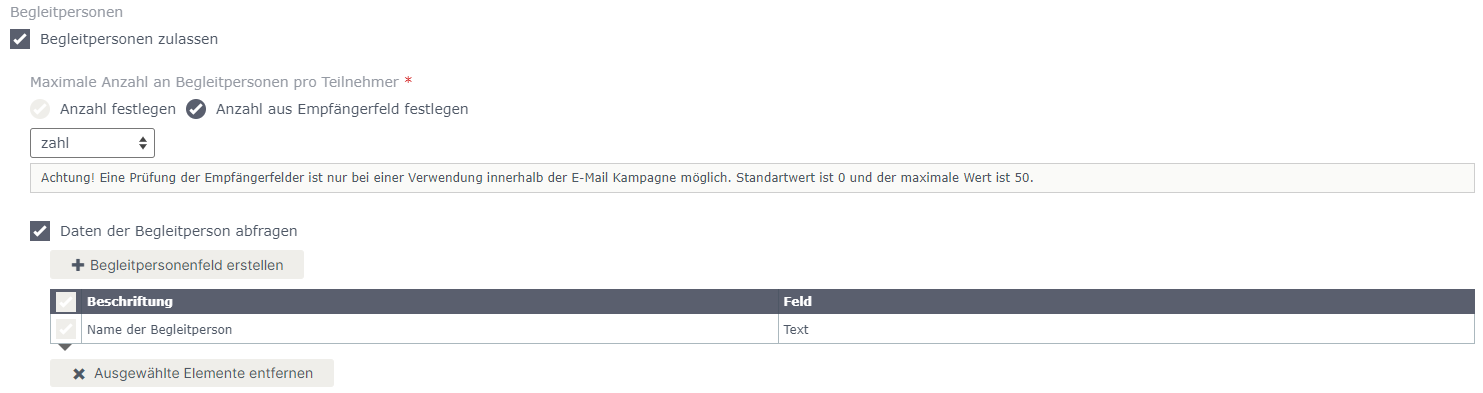
Bei der Anmeldung können Sie entscheiden, ob Sie Begleitpersonen zulassen möchten und wie viele Begleitpersonen eine Person mitbringen darf. Die maximale Anzahl der Begleitpersonen kann mit einem fixen Wert oder durch ein Empfängerfeld definiert werden. Das Empfängerfeld muss dafür vom Typ „Zahl“ sein. Nur bei der Verwendung in einer E-Mail Kampagne wird die maximale Begleitpersonenanzahl auf den Wert des Empfängerfeldes gesetzt.
Ebenfalls können Sie eine Beschriftung für ein Formularfeld hinterlegen, um gewünschte Informationen der Begleitpersonen (z.B. Name der Begleitperson) abfragen zu können.
Wie kann ich das Feld „Begleitperson“ im Formular integrieren?
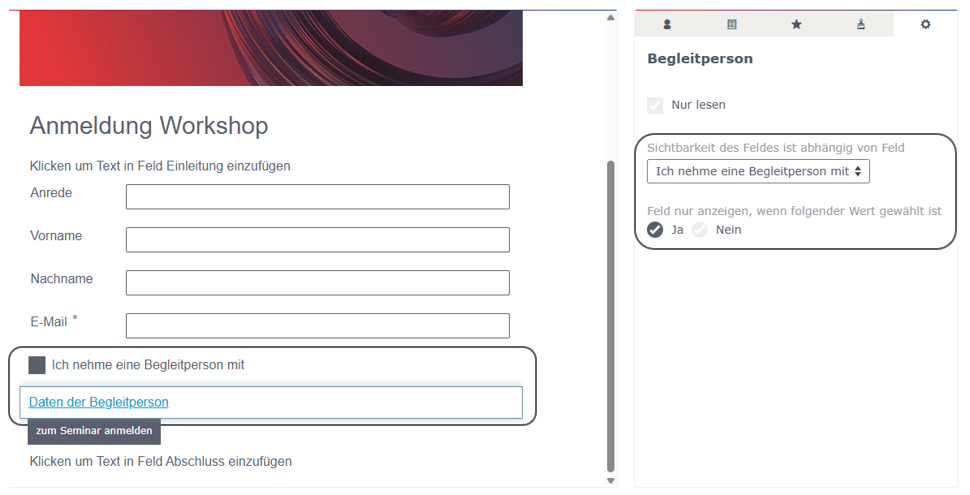
Nachdem Sie im Reiter „Anmeldung“ des Eventformulars eingestellt haben, dass eine Begleitperson zugelassen werden soll, haben Sie im Reiter „Inhalt“ des Formulars die Möglichkeit, das Feld für die Abfrage der Begleitperson hinzuzufügen. Wechseln Sie dazu in den Reiter „Extras“ (Stern), um das Feld „Begleitperson“ einzufügen. Die Beschriftung des Formularfeldes kann im Reiter „Anmeldung“ eingestellt werden.

Darüber hinaus kann die Sichtbarkeit des Begleitpersonenfelds abhängig von anderen Feldern gesteuert werden. Dadurch lässt sich beispielsweise zunächst über ein Ja/Nein-Feld abfragen, ob eine Begleitperson zum Event mitgebracht wird.
Wird hier „Ja“ ausgewählt, können anschließend die gewünschten Felder zur Eingabe der Daten der Begleitperson angezeigt werden. Wird „Nein“ gewählt, bleiben diese Felder ausgeblendet.
Welche Anpassungen sind im Reiter „Absage“ möglich?
Vor allem, wenn die Plätze für Ihr Event begrenzt sind, ist es sinnvoll, Angemeldeten die Möglichkeit zu geben, sich von der Veranstaltung abzumelden, wenn sie doch verhindert sind. Dadurch werden Plätze für Gäste auf der Warteliste frei.
-
Im ersten Bereich können Sie den Text definieren, der angezeigt wird, wenn Angemeldete auf den Absage-Link in einer Kampagne klicken. Diese Angabe ist optional, da Sie diesen Linktyp nicht unbedingt einsetzen müssen und wird nur angezeigt, wenn ein Absagefeld hinterlegt ist.Mithilfe des Absagefeldes können Sie weitere Informationen abfragen. Zum Beispiel einen Absagegrund oder ob die Unterlagen zum Event trotzdem zugesendet werden sollen.
Wie der Absage-Link in Ihrer Kampagne hinterlegt werden kann, erfahren Sie im folgenden Whitepaper.
-
Das zweite Textfeld ist ein Pflichtfeld. Hier definieren Sie den Bestätigungstext nach einer Absage der Veranstaltung. Die Angabe des Textes ist notwendig. Ist nämlich ein Empfänger bereits für das Event angemeldet, erhält er bei erneutem Klick auf den Anmeldelink die Information, dass er bereits angemeldet ist und die Option, sich von der Veranstaltung abzumelden.
Tipp: In der Vorschau können Sie prüfen, wie der „Text der Absageseite“ bei Ihren Empfängern dargestellt wird.

Wie kann ich ein Formular testen?
Der einfachste Weg ist, das Formular über das Formular- oder event-Dashboard aufzurufen. Wurde bei Ihrem Event bereits ein Formular hinterlegt, finden Sie oben rechts in der entsprechenden Kachel des event-Dashboards ein Symbol, um das Eventformular aufzurufen. Bei Klick auf dieses Symbol öffnet sich ein Fenster im Browser, womit Sie das Formular ausfüllen, abschicken und somit die Eventanmeldung testen können.

Ebenfalls haben Sie die Möglichkeit, das Formular zu testen, wenn Sie im Formular in den Reiter „Verwenden“ wechseln. Kopieren Sie sich dazu die „Url zum Formular“ und fügen diese in einem neuen Browser Tab ein.

Hinweis: Bei einer Testkampagne können Sie das Formular nicht testen, da hier ansonsten der „Vorschau-Empfänger“ überschrieben wird.
Wie kann ich den Status des Eventformulars ändern und welchen Einfluss hat dieser?
Bearbeiten Sie das gewünschte Eventformular, um den Status des Formulars zu ändern. Anschließend haben Sie in jedem Reiter oben neben dem Button „Speichern“ und „Abbrechen“ die Möglichkeit, den Status zwischen ‚Online‘ und ‚Archiviert‘ zu ändern.
Ob beim Eventformular der Status ‚Online‘ oder ‚Archiviert‘ hinterlegt ist, hat für die Verwendung im Event keine Auswirkung. Der Status wirkt sich lediglich auf die Gruppierung in der Listenansicht aus.

Welche Informationen erhalte ich im Dashboard?
So wie in jedem Karteireiter ist am Anfang der Seite der Formular-Name, sowie der Status ersichtlich.
Am Dashboard des Eventformulars finden Sie die Formular-Infos wobei Sie erkennen können, ob das Formular gesperrt ist und ab welchen Zeitpunkt das Formular gesperrt ist. Ebenfalls ist ersichtlich, von welchem Benutzer und wann das Formular erstellt wurde sowie welche Sprache hinterlegt ist. Diese Einstellungen können jederzeit bearbeitet werden.
Eine Vorschau Ihres Formulars finden Sie ebenfalls am Dashboard, welches Sie auch in einem eigenen Fenster öffnen können. Dabei können Sie direkt am Dashboard sowie auch im eigenen Vorschau-Fenster bei der Darstellung das Format Desktop oder Mobil auswählen.
Ebenfalls können Sie am Dashboard auf einen Blick erkenne, welche Aktionen beim Formular festgelegt wurden. Dabei wird zwischen Aktionen für Empfänger und Aktionen für Benutzer entschieden. Ebenfalls ist ersichtlich, ob eine Erfolgs- und Fehlerseite konfiguriert wurde.
In einer weiteren Kachel am Dashboard ist ersichtlich, ob das Formular im Newsletter und/oder auf der Website verwendet wird. Ebenfalls ist hier ersichtlich, welche Einstellungen beim Datenabgleich hinterlegt wurden.
Einen weiteren interessanten Einblick bietet die Kachel „Statistik“. Hier sind die Formular Aufrufe und Abbrüche ersichtlich. Wurde das Formular auf der Website eingebunden, ist auf einen Blick erkennbar, ob sich bestehende Empfänger und/oder neue Empfänger angemeldet haben.

Updated 6 months ago