
[EN] Subscriber Dashboard
Perfect overview of your subscribers
Keep track of your subscribers – the subscriber dashboard from mailworx is there to help. Important information about your subscriber base is summarized and displayed in a clear dashboard. How many subscribers are currently in your database? How active are these and what about your data quality? All of these are questions that are cleared up at a glance. Furthermore, you have the possibility to go into detail at some points.
Where can I find the subscriber dashboard in the eworx Marketing Suite?
The clear subscriber dashboard can be found directly in the subscriber module of the eworx Marketing Suite. Switch through the navigation to ‚Subscribers‘ and the data is loaded for your entire subscriber database.
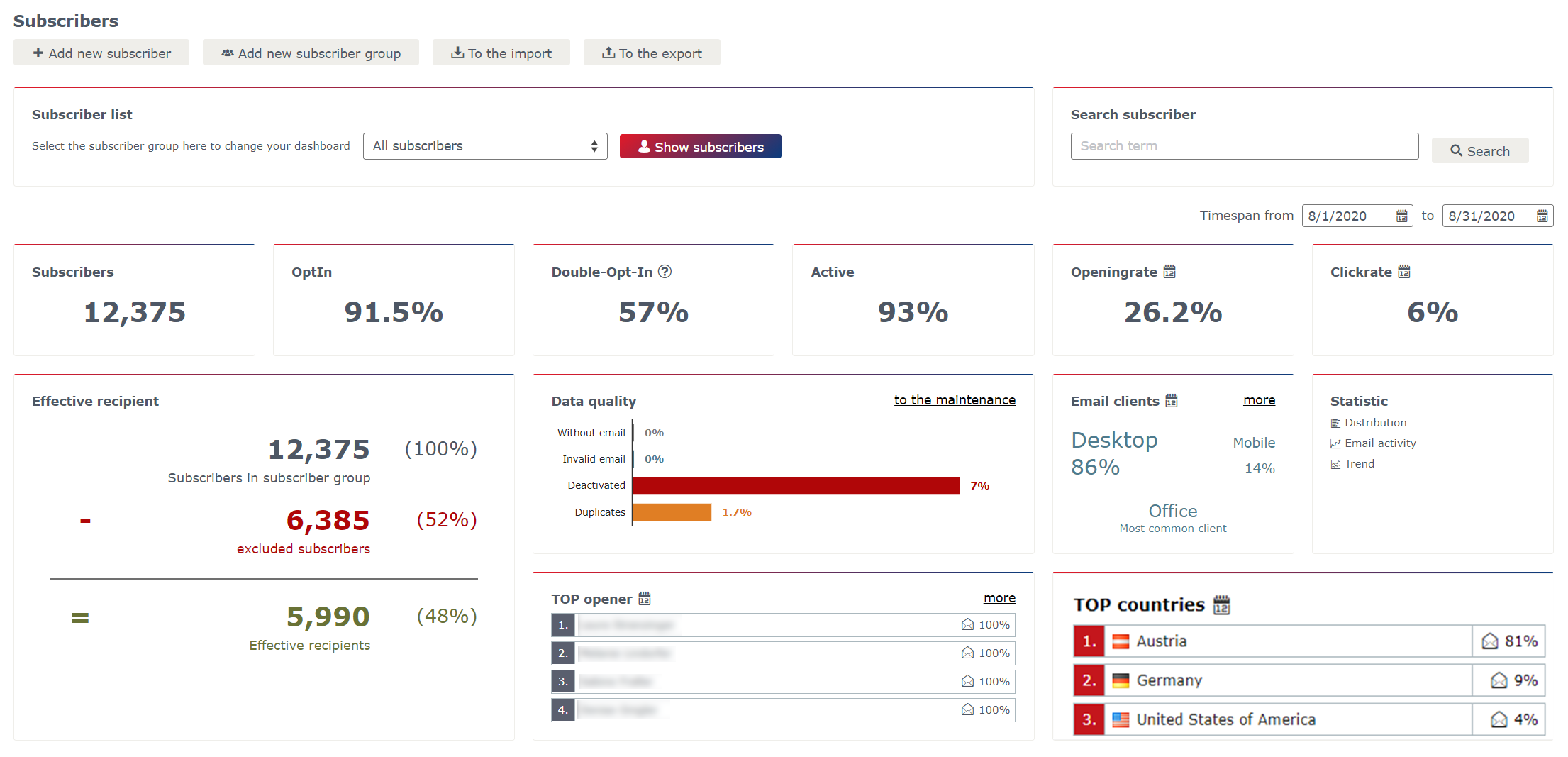
You would like to view the statistics for a specific subscriber group? No problem. Simply select the desired group in the section „Subscriber list“ and the data will be updated automatically.

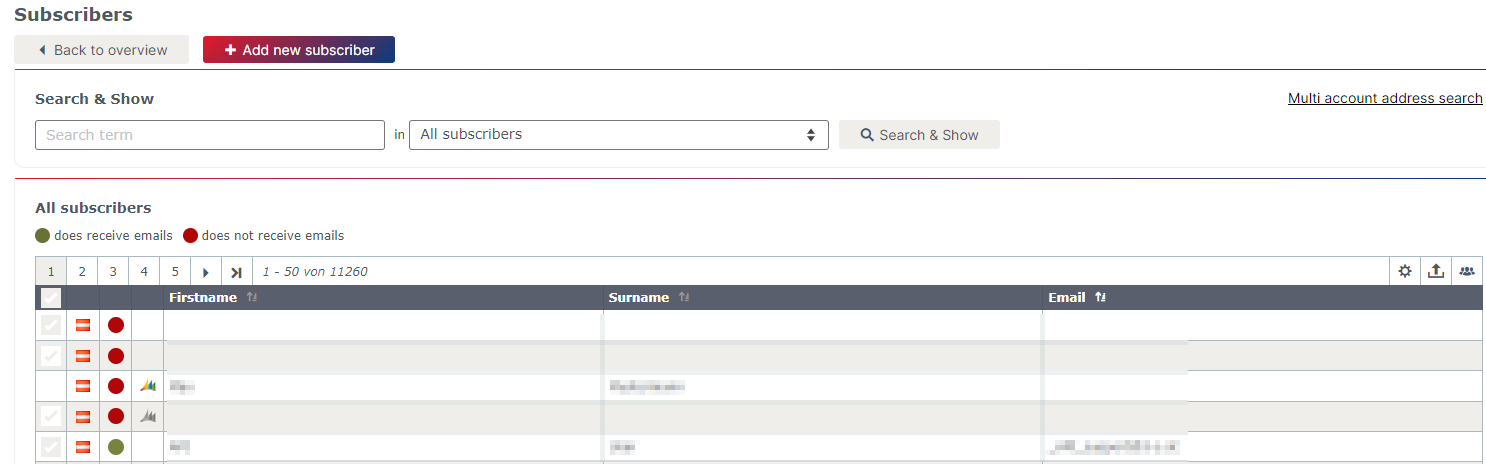
The button „Show subscribers“ brings you to a subscriber list where you can search through your subscriber base and edit the corresponding recipients.
Which information do I get in the subscriber dashboard?
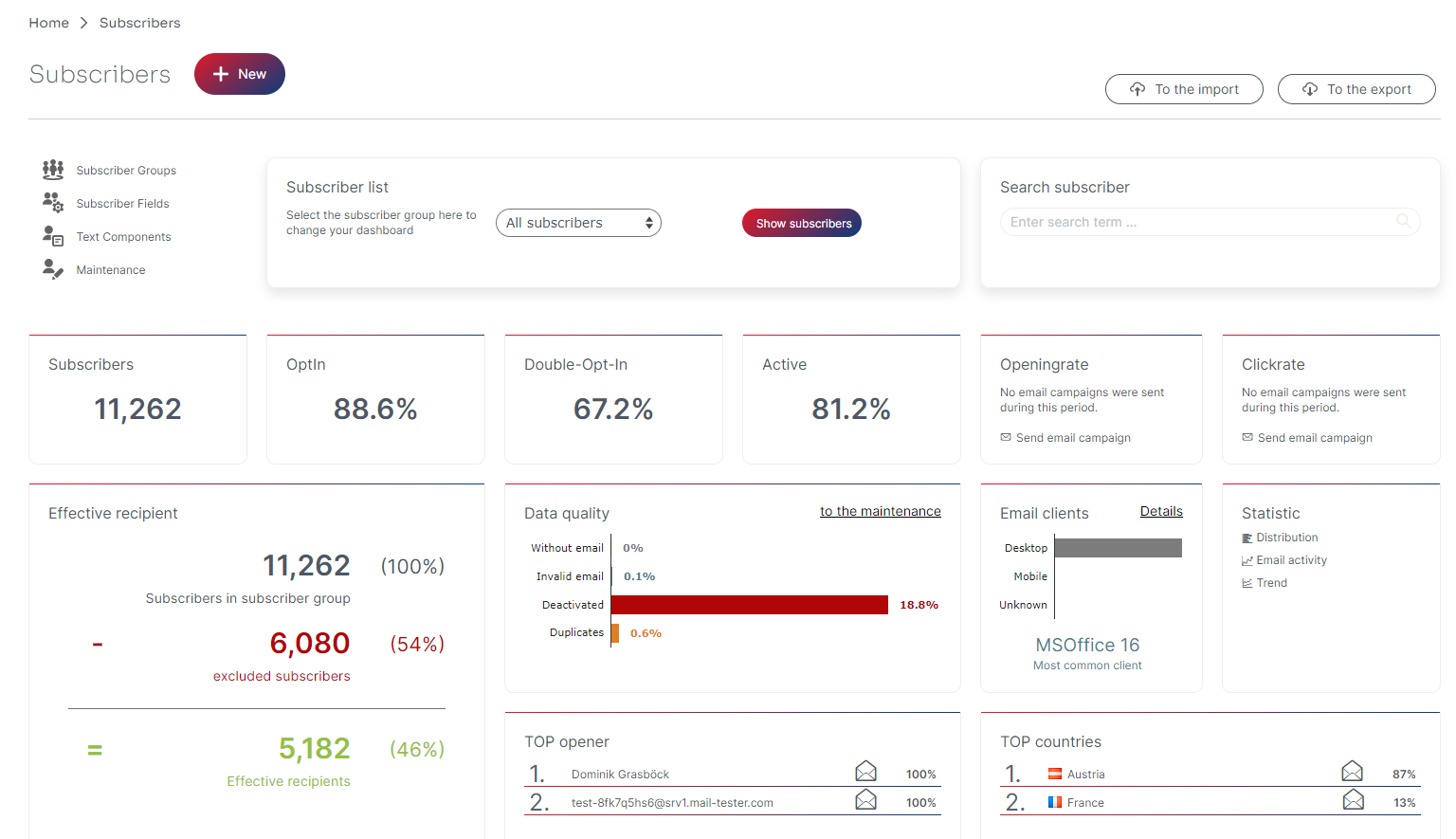
The subscriber dashboard of the eworx Marketing Suite combines the most important aspects of your subscriber base and prepares it clearly for you. You get a versatile overview and can go deeper into some areas in order to get the most out of your marketing activities.
Timespan
Here you can define the desired period of your subscriber evaluation. All areas within the dashboard that are marked with a calendar icon adapt to the corresponding selection and deliver the desired results.
Subscribers
This area shows the current number of subscribers in your subscriber database. Click on it to get to the corresponding subscriber list.
Opt-In
The percentage in this section gives you a sense of how many of your subscribers are subscribed to your newsletter. Click on it to get to the corresponding subscriber list.
Double-Opt-In
This metric gives you an overview of how many of your recipients have successfully documented the double-opt-in status. More about this topic can be found in this newsletter tutorial.
Active
Subscribers can be disabled due to an automatic bounce management of the eworx Marketing Suite. This section gives you an overview of how many of your subscribers are not classified as disabled and therefore are active.
Effective recipient
Effective recipients are all those who are actually getting a mailing when sending a campaign. If you click on the item „excluded subscribers“, you will get an overview of why the subscribers are excluded from the dispatch.
To be classified as an effective recipient, some characteristics have to apply to the subscriber. Among other things, there have to be a valid email address, the Opt-In field has to be set „Yes“ and the double-opt-in status has to be documented.
Data quality
It’s also worth taking a look at the data quality of your subscriber base. In this section, you get an overview of the influencing factors. By clicking on „to the maintenance“ you will be redirected to the corresponding editing options.
Subscribers without or with an invalid email address as well as duplicates are not relevant for your email marketing measures because they won’t bring any added value. As your subscriber database continues to grow, data must be continually maintained as needed.
Opening rate
The opening rate is one of the key metrics in email marketing. The subscriber dashboard tells you how active your subscribers have been in the past month. This means: How many percent of the total recipients have opened your mailing on average. By clicking on the percentage, you will get to the detailed view of the email activity.
Click rate
How often do your subscribers click on one of the links in your mailings? This is exactly what the click rate answers in the subscriber dashboard. The values are always related to the last month. Clicking on the number will take you to the detailed view of the email activity to find out more about your subscribers.
TOP opener
As an email marketer, you are pleased about all recipients who open the well-prepared newsletter. In the section „TOP opener“, you can see who are the most active subscribers and actually open most of your mailings. The „more“ link takes you directly to the corresponding evaluation of the email activity of your subscribers.
TOP countries
The section „TOP countries“ refers to the location of your subscribers. This information gives you an overview of the countries in which most openings are made – again in relation to the last month.
Email clients
Another important insight in the field of email marketing relates to the email clients. Learn more about which clients your recipients use in this section of the subscriber dashboard. This can be either via a desktop application or via mobile device. In addition, you will get the information about the most frequently used clients of your subscribers.
Statistic
For some areas of the subscriber dashboard, you can gain more important insights in detailed analysis. You can see which of these are in the section „Statistic“ – more about the detailed views you can learn in the following.
Are there any statistics that I can look to in more detail?
Deal with your subscriber base to gain insight into your email marketing activities. The subscriber dashboard already gives you a good overview. In some areas, however, you also have the option to continuing your analyzes in more detail:
- Many elements in the dashboard are clickable and lead you directly to the corresponding subscriber list.
- Via links in the top right corner of some sections, you will get further to a details view.
- The section „Statistic“ provides an overview of all additional analyze options for your subscribers.
Updated 5 months ago