
[EN] Creating a WhatsApp Newsletter - Overview
Everything you need to know to create a WhatsApp newsletter
In times of direct and personal communication, WhatsApp newsletters are becoming increasingly important. WhatsApp offers an ideal platform for sending targeted information to your community quickly and reliably.
WhatsApp newsletters can be created and sent in the “messaging” module. However, you must first confirm that you agree to the use of third-party providers required to send the newsletters. Once you have confirmed this, you can start creating your newsletter.
In this whitepaper, we will show you step by step how to create a WhatsApp newsletter with the eworx Marketing Suite.
The path to the WhatsApp newsletter: All steps at a glance
In order to create a WhatsApp newsletter, you must first give your consent to the third-party provider (see above). The next step is to set up a WhatsApp Account and link it to the eworx Marketing Suite. A WhatsApp Template and a WhatsApp Newsletter must then be created. As soon as your WhatsApp newsletter has been sent, you can use the statistics to draw conclusions. You can find step-by-step instructions for creating your WhatsApp newsletter in this whitepaper.
How to set up the double opt-in process for your WhatsApp newsletter is explained in detail in the following whitepaper.
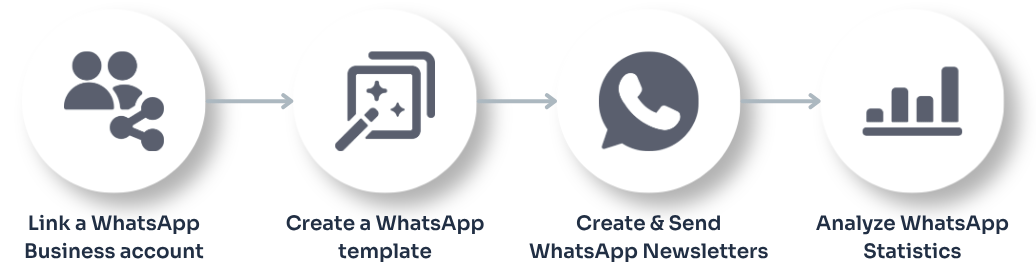
Step 1: Link Your WhatsApp Business Account
Before you can send WhatsApp newsletters, you must link your WhatsApp Business account to the eworx Marketing Suite. Our guide explains how to set up and link your account, as well as the requirements for doing so.
Step 2: Create a WhatsApp template
Approved WhatsApp templates are required to send WhatsApp newsletters. In this step, you’ll learn how to create and personalize templates and submit them to WhatsApp for approval.
Step 3: Create & Send a WhatsApp Newsletter
Once you've linked your WhatsApp account, you can create your first WhatsApp newsletter. These instructions will show you how to structure your content, select recipients, and send your newsletter.
Step 4: Analyze WhatsApp Statistics
Once your message has been sent, you’ll have access to a wide range of statistics and analysis tools. In our white paper, you’ll learn how to analyze opens, clicks, and delivery status, and evaluate the success of your campaigns.
Updated 2 months ago