
[EN] Tracking protection mechanisms
Another effect of this feature is that all images in an email are automatically loaded in the background, regardless of whether the subscribers actually open or read the email. Since tracking pixels are also loaded as images, an open is often recorded even though the email wasn’t actively opened. This can misrepresent the open rate in newsletter reporting.## How tracking protection mechanisms affect email statistics
Since the introduction of tracking protection mechanisms by major providers such as Apple (Mail Privacy Protection starting with iOS 15/macOS Monterey) and proxy solutions like those offered by Gmail, the significance of traditional email metrics has changed significantly. While open rates were once considered a key performance indicator in newsletter marketing, their interpretive value is now limited.
How does email tracking work?
To understand the effects of privacy settings, it helps to look at the technical underpinnings. Traditional email tracking relies on what are known as tracking pixels. These are small, invisible image files that are loaded when an email is opened. As soon as this image is retrieved from the server, the email is considered opened.
In addition, links in newsletters are usually tracked. When a subscriber clicks on a link, this is recorded in the statistics. This allows for the collection of data on opens, clicks, device information, and - via the IP address - even approximate location data.
This is precisely where modern tracking protection mechanisms come into play.
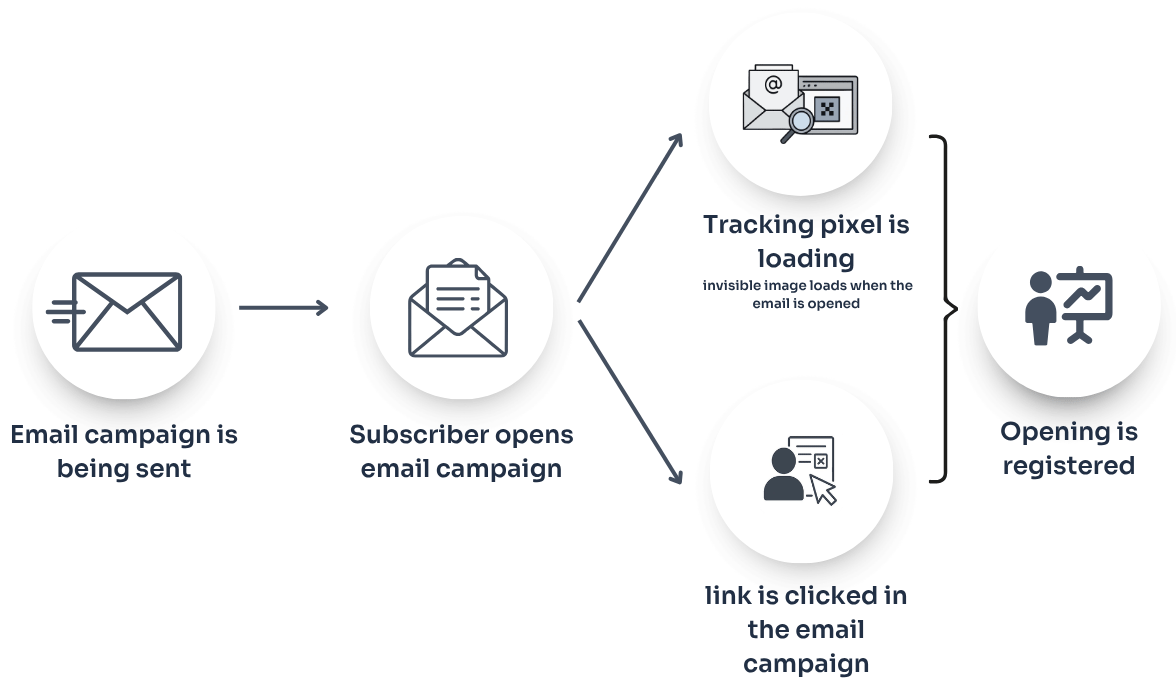
How is it possible that email campaigns are counted as opened even though subscribers haven't opened them?
Modern privacy features sometimes load images automatically in the background or via proxy servers - regardless of whether the subscriber has actually read the message. As a result, open rates may appear artificially inflated, open times may be inaccurate, and location data may be unreliable.
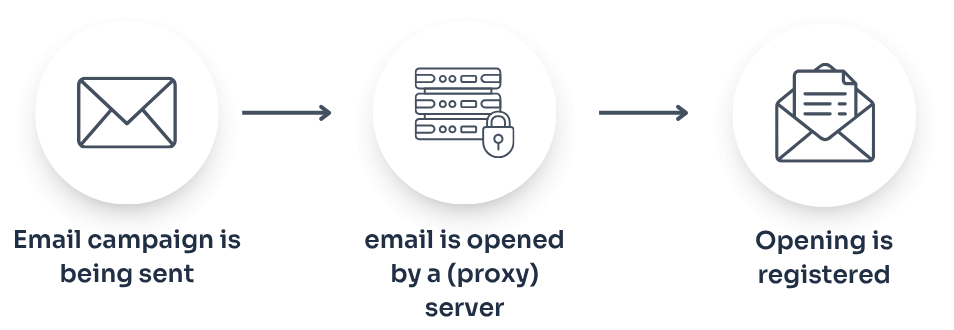
What does this mean for reporting?
The open rate should not be considered the primary performance indicator. An increase in the open rate does not automatically indicate improved performance. Active interactions, such as individual clicks within the email, are, however, reliably measurable. The click rate thus becomes more significant, as it represents a deliberate action on the part of the subscriber. Even more meaningful are conversion metrics such as purchases, sign-ups, or form submissions, provided these are tracked accordingly. You can find instructions on how to link Google Analytics with the eworx Marketing Suite here.
Metrics such as bounces or unsubscribes also remain valid indicators.
When evaluating newsletter campaigns, it is therefore advisable to focus more on click and conversion data and to interpret open rates only within the overall context.
Automations or reactivation campaigns should not be based exclusively on “unopened” criteria but should take actual click and interaction behavior into account.
Why are link clicks tracked even though subscribers haven't actively clicked on them?
In addition to falsified open rates, clicks can also be affected by tracking and security mechanisms. Many email clients, security gateways, and antivirus programs automatically scan incoming messages for potential threats. As part of this process, links in the messages are automatically clicked to analyze their destination pages for malicious code, phishing attempts, or malware.
These security checks typically take place immediately after the email is delivered - even before the subscriber has actually opened the message. Technically speaking, the link is “clicked” during this process, which registers a click in the system. In the statistics, this appears as a genuine interaction, even though the recipient did not consciously take any action.
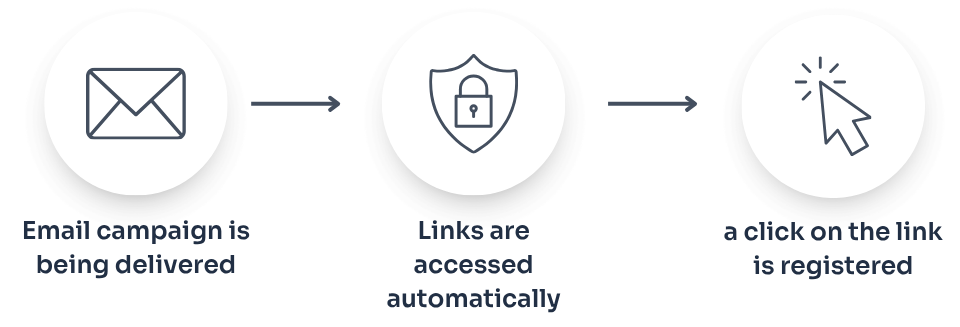
In principle, such automated security clicks should be detected by the eworx Marketing Suite’s filtering mechanisms and excluded from the statistics. Modern tracking systems attempt to identify typical patterns of automated testing and do not count them as genuine interactions. Nevertheless, depending on the protection mechanism used or its technical specifications, automated clicks may still appear in the statistics.
A typical sign of automated clicks is the following pattern:
- Several or all of the links in an email are clicked almost simultaneously.
- The clicks occur within a few seconds of delivery.
- The time intervals between individual clicks are identical or very short.
When evaluating campaign statistics, it is therefore important to identify such anomalies and not to interpret them too hastily as unusually high engagement. A careful analysis and consideration of technical factors are therefore crucial for a realistic assessment of campaign performance.
What tracking mechanisms are available?
Apple Mail Privacy Protection (MPP)
Apple's Mail Privacy Protection (MPP) is a privacy feature introduced withiOS 15, iPadOS 15, and macOS Monterey. It is designed to prevent the tracking of subscribers email opening behavior. However, the feature only works if subscribers use the original Apple “Mail” app on an iPhone, iPad, or Mac. Other email apps on these devices are not affected.
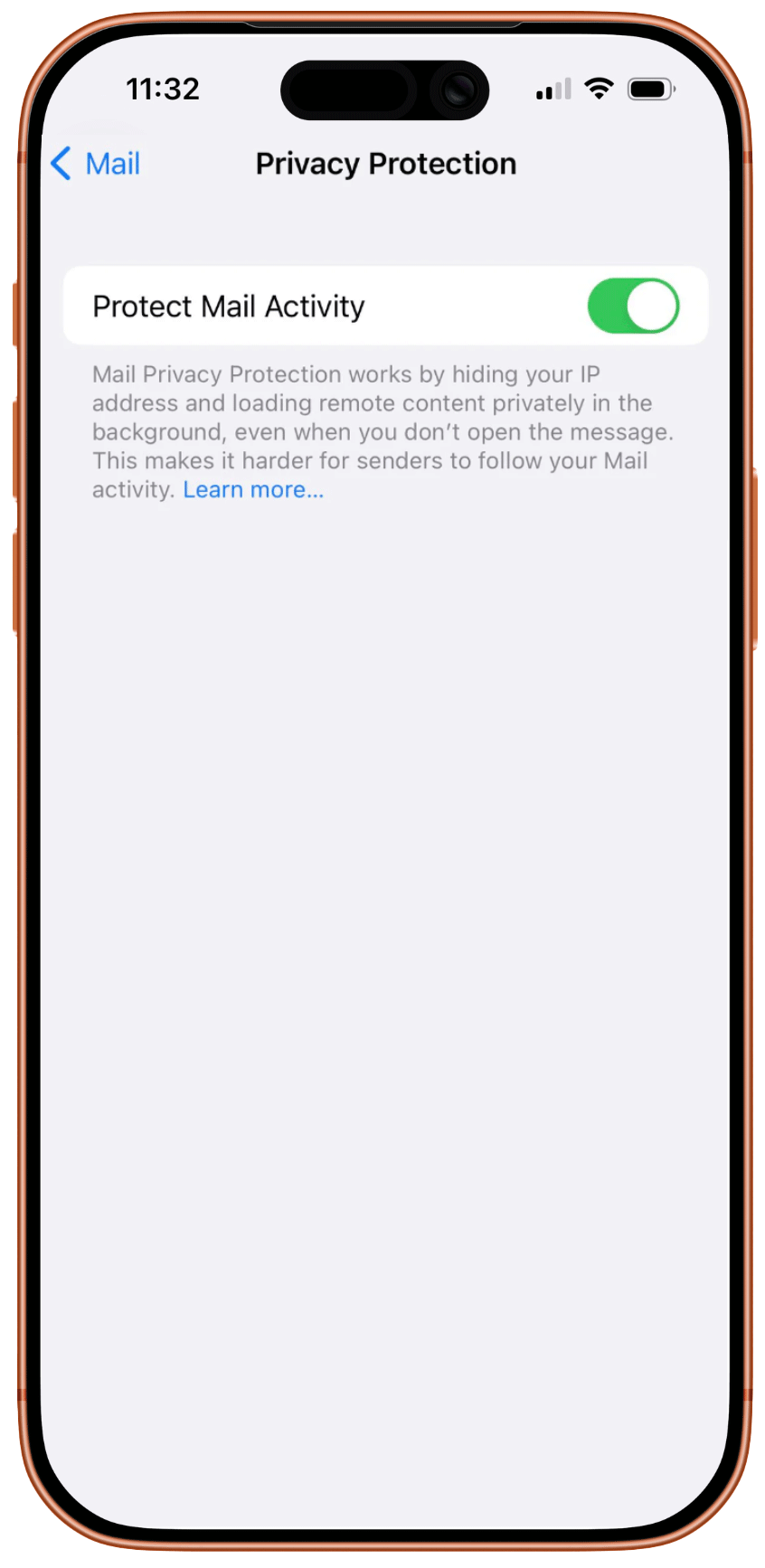
When Mail Privacy Protection is enabled, email content - particularly images and tracking pixels - is automatically loaded via Apple’s proxy servers. This hides the subscriber’s IP address, making it impossible to reliably determine their geographic location or the device they are using.
Another effect of this feature is that all images in an email are automatically loaded in the background, regardless of whether the subscribers actually open or read the email. Since tracking pixels are also loaded as images, an open is often recorded even though the email wasn’t actively opened. This can misrepresent the open rate in newsletter reporting.
A typical example of this is when emails appear to be opened at night, even though the newsletter was delivered earlier in the day. These “opens” are usually not triggered by a person. Instead, the Apple Mail app often automatically loads remote images when an iPhone or Mac is connected to Wi-Fi and charging - a situation that typically occurs at night. When Apple’s servers retrieve the images and tracking pixels at that moment, the system interprets this as an email open.
To ensure the statistics remain as meaningful as possible, technical measures have been implemented in the email statistics so that Apple Mail users with Mail Privacy Protection enabled are not included in the open statistics or open-based automations.
Important to know: Clicks within an email are not affected by this feature. Therefore, click rates and other interactions can still be reliably measured. For this reason, it is increasingly recommended to rely more heavily on clicks and other interactions as key metrics for measuring the success of email campaigns, rather than relying exclusively on the open rate.
Proxy Servers and IP Masking
Apple isn’t the only one using proxy technologies. Other providers also anonymize IP addresses or mask location information. This limits the accuracy of location and device analytics. In addition to Apple Mail, other email providers also employ various measures to limit email tracking. In addition, using a VPN can help encrypt the IP address, thereby making tracking more difficult. The protection mechanisms vary depending on the provider and email client.
Gmail

Gmail offers basic protection against email tracking, but not comprehensive protection. For example, Gmail can automatically block so-called tracking pixels (web beacons) if an email is flagged as potentially suspicious.
In addition, users can enhance their protection with browser extensions. Extensions for Chrome or Firefox detect tracking pixels in emails and automatically block them. This prevents a tracking signal from being sent to the sender when the email is loaded.
GMX
GMX also offers various ways to limit email tracking. One such measure is to prevent images from being downloaded automatically. Since tracking pixels are usually embedded as invisible images, this setting prevents the opening of an email from being tracked.
Another option is to use email alias addresses. GMX allows you to create multiple alias addresses within an existing mailbox. These can be used, for example, for newsletter subscriptions or registrations, so that the actual primary address remains better protected.
In addition, GMX users can utilize browser extensions to block tracking technologies. Such extensions remove tracking pixels or load images via a proxy server with a generic IP address, ensuring that the user’s actual IP address and location remain hidden.
Outlook

In Microsoft Outlook, users can also take steps to reduce email tracking. One important setting is to disable the automatic loading of images in emails. This prevents tracking pixels from loading automatically when the email is opened.
In addition, browser extensions or specialized tracking blockers can also be used here. These detect tracking technologies within emails and block their functionality - even when images in the email are loaded.
What strategies are available for dealing with tracking protection mechanisms?
Workflows based solely on opens are no longer effective. Instead, it is recommended to use click behavior, website interactions, or actual purchases as a basis.
The quality of the recipient list is also becoming increasingly important. A clean double opt-in process, regular subscriber cleansing, and relevant content not only improve deliverability but also strengthen the trust of the target audience.
Conclusion
Overall, these examples show that many email providers and tools offer various mechanisms to protect privacy. For email marketing, this means that open rates in particular may become increasingly inaccurate, while clicks and other interactions continue to be considered more reliable metrics.
Updated 6 months ago